


• New Horizons on Maelstrom
    Maelstrom New Horizons


    Visit our website www.piratehorizons.com to quickly find download links for the newest versions of our New Horizons mods Beyond New Horizons and Maelstrom New Horizons!

Convert models

kira5z

Landlubber
Hey fuys, new here, recently started getting into sea dogs and i usually mod most of my games, i tried to replace some models with some others from a different corsair game and while some work to some degree most get their rigging deformed. What would be the best way to re rig a model from say corsairs 3 to corsairs to each his own. Or make a mod model compatible
 
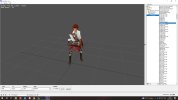
If your character looks something like this...
beatrice_wrong.jpg
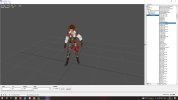
... then it's probably using the wrong animation. With the correct animation...
beatrice_right.jpg

Incidentally, if you don't already have it, get Animation View:
https://piratesahoy.bowengames.com/Cloud/Tools/Modeling+Texturing/Animation View.7z

That's what I used in those screenshots. You can set the default folder in which it looks for animations, then open your choice of animation file. You'll usually find the animations in a folder such as "Resource\Animation".
 
For a start, download Animation View. Look at the "Settings" tab, where you'll find "Animation location" and "Texture location":
aniview_settings.jpg

Set those to point at your "Resource\Animation" and "Resource\Textures\Characters" folders respectively.

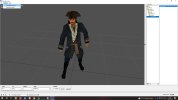
Load the model. If it appears plain grey instead of properly shaded, make sure the texture file ("cpt_jack_1.tga.tx") is in your "Resource\Textures\Characters" folder.

Now go to the "File" tab, click "Open ANI", and pick one of the files from your "Resource\Animation" folder. If the character disappears or is distorted, try another file. If you can't get the model to work with any of your animations, I can upload one which certainly works in Animation View, as you can see in that picture.
 
Okay and if it works with one of the animations, what would i have to do to save it?
Thank you so much for all the help by the way.
 
Last edited:
For a start, download Animation View. Look at the "Settings" tab, where you'll find "Animation location" and "Texture location":
View attachment 45302

Set those to point at your "Resource\Animation" and "Resource\Textures\Characters" folders respectively.

Load the model. If it appears plain grey instead of properly shaded, make sure the texture file ("cpt_jack_1.tga.tx") is in your "Resource\Textures\Characters" folder.

Now go to the "File" tab, click "Open ANI", and pick one of the files from your "Resource\Animation" folder. If the character disappears or is distorted, try another file. If you can't get the model to work with any of your animations, I can upload one which certainly works in Animation View, as you can see in that picture.
Okay im using the Jack model from another mod, and i think I would replace the anim file that works with sharles but so far i havent found one that works for this model
Trying for this one Гавань Корсаров - Категории файлов: Новые герои - Модификация "Новые герои - Пакет 77 " which is higher quality but no animation models fit so far.
Edit> I found one that works for normal animations but none that works for shooting animations so far.
Also from what I understand, since Caribbean Legend uses different animations for aiming, it might be a bit more complicated to have a model work with guns
 
Last edited:
Okay and if it works with one of the animations, what would i have to do to save it?
Thank you so much for all the help by the way.
That I don't know, because my modding work is on "Pirates of the Caribbean: New Horizons". Character models can be adapted between the various pirate games, which is why I can work with that "Cpt_Jack.gm" model. But the files which put the models into the game are probably not the same. So you probably don't have folder "Program\Models", which is where "New Horizons" has a file called "initModels.c" which defines all the models in the game.

How do you normally add your choice of model into the game?
 
That I don't know, because my modding work is on "Pirates of the Caribbean: New Horizons". Character models can be adapted between the various pirate games, which is why I can work with that "Cpt_Jack.gm" model. But the files which put the models into the game are probably not the same. So you probably don't have folder "Program\Models", which is where "New Horizons" has a file called "initModels.c" which defines all the models in the game.

How do you normally add your choice of model into the game?
I mean, i managed to put it in game, i do have the same folder with all the models and everything, i just think aiming uses different animations and that might be an issue
I swapped out Sharles model for Jack but now because the ani file doesnt have shooting animations, i cant shoot the guns at all
 
Okay im using the Jack model from another mod, and i think I would replace the anim file that works with sharles but so far i havent found one that works for this model
Trying for this one Гавань Корсаров - Категории файлов: Новые герои - Модификация "Новые герои - Пакет 77 " which is higher quality but no animation models fit so far.
Edit> I found one that works for normal animations but none that works for shooting animations so far.
Also from what I understand, since Caribbean Legend uses different animations for aiming, it might be a bit more complicated to have a model work with guns
From that pack, "New_heroes_77_GPK", animation "man2_ab.ani" seems to work in Animation View but it has no "rifleshot" or "matchshot" animations. I've another version of "man2_ab.ani" which does have "rifleshot", and they're both copies of the animation for "shot".

All ".ani" files are plain text. You can edit them with your choice of text editing program. Edit "man2_ab.ani", find the section for "shot", copy and paste it, and rename the copy to "rifleshot". Make another copy and rename it to "matchshot". But first, make a copy of the original file "man2_ab.ani" so that if this goes wrong, you can put the original file back!
 
From that pack, "New_heroes_77_GPK", animation "man2_ab.ani" seems to work in Animation View but it has no "rifleshot" or "matchshot" animations. I've another version of "man2_ab.ani" which does have "rifleshot", and they're both copies of the animation for "shot".

All ".ani" files are plain text. You can edit them with your choice of text editing program. Edit "man2_ab.ani", find the section for "shot", copy and paste it, and rename the copy to "rifleshot". Make another copy and rename it to "matchshot". But first, make a copy of the original file "man2_ab.ani" so that if this goes wrong, you can put the original file back!
yea im guessing its a little more complicated with caribbean legends because they introduced the whole aiming stuff so the animations are different
 
From that pack, "New_heroes_77_GPK", animation "man2_ab.ani" seems to work in Animation View but it has no "rifleshot" or "matchshot" animations. I've another version of "man2_ab.ani" which does have "rifleshot", and they're both copies of the animation for "shot".

All ".ani" files are plain text. You can edit them with your choice of text editing program. Edit "man2_ab.ani", find the section for "shot", copy and paste it, and rename the copy to "rifleshot". Make another copy and rename it to "matchshot". But first, make a copy of the original file "man2_ab.ani" so that if this goes wrong, you can put the original file back!
since the first model i sent is a reskin of the hol soldier i just replaced both tga and gm file with the hol soldier as a workaround for now since i have no idea how else i would make it work
 
Have a look at this:
Tutorial - Porting characters from PotC to CoAS
You're not porting a character from PoTC, but the basics should be the same. CoAS probably has the same folder structure as TEHO. So, copy the .gm model file and .tga.tx texture file into the usual places (probably "Resource\Models\Characters" and "Resource\Textures\Characters"). Then follow the instructions in that thread for how to make a character who uses the new model.
 
Back
Top