













Continuing from the post here.
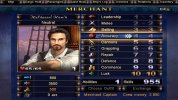
When I centered the skill separator I did so by changing the coordinates in
To do this properly and prevent this particular compatibility issue from continuing I have now changed the separator in the texture file to more closely match the numbers and centered it, and reverted the coordinates to how they were.
If the separator is now too dark in the interface, the









When I centered the skill separator I did so by changing the coordinates in
PROGRAM\INTERFACE\character.c, but the proper way to do it is to actually center the separator in the RESOURCE\Textures\FONTS\interface bold numbers.tga.tx texture file itself. These changed coordinates cause a compatibility issue in the various New Horizons versions since they use different texture files.To do this properly and prevent this particular compatibility issue from continuing I have now changed the separator in the texture file to more closely match the numbers and centered it, and reverted the coordinates to how they were.
If the separator is now too dark in the interface, the
1 in ChangeStringColor(stringname,SetAlphaIntoColor(COLOR_MONEY,GetAlphaFromSkill(1))); in SetSkillShow() can be changed to another value from 1 to 10 such as 5 or 10 or even follow along with modval (the value on the right). 



